
The Inbox That Turns Conversations Into Published Episodes
How to use the Talks inbox workflow, authority signals, and response rate to move every match from first message to recorded interview

You’ll go through this one way or another (and there’s no skip button either).
It goes something like this:
You match with someone great. The conversation starts well. You exchange a few messages. And then somewhere between “let’s find a time” and an actual recording date, it just... stops.
No one did anything wrong. Life got busy. The thread got buried. The opportunity disappeared somewhere between Seen and Read.
The gap between a match and a published episode isn’t talent or timing. It’s organization. And the Talks inbox was rebuilt from the ground up specifically to close that gap.
This post is a complete walkthrough of how the inbox works, what the authority signals mean for your visibility on the platform, and exactly how to move every single conversation from first message to recorded interview without losing track of anything along the way.
Why Most Podcast Collaborations Fall Apart Before They Happen
Before we get into the inbox workflow it helps to understand where the breakdown usually happens.
Conversations live in too many places: Email, DMs, calendar links, follow-up reminders, all spread across different tools with no single view of where each opportunity actually stands
There’s no visibility into who needs to reply: When you’re managing multiple conversations at once it’s easy to lose track of whose turn it is and let threads go cold without meaning to
There’s no natural momentum toward a recording: Messaging alone isn’t a system; without clear stages to move through a conversation can stay active indefinitely without ever becoming a scheduled interview
The Talks inbox was built around one goal: turn conversations into published episodes. Every feature in it exists to serve that single outcome.
The Inbox Workflow: Five Stages, One Goal
Every conversation in your Talks inbox moves through a clear five-stage workflow. Understanding what each stage means and how to move conversations through them is the core skill of using the platform well.
Here’s how each stage works.
1. 🟢 Active
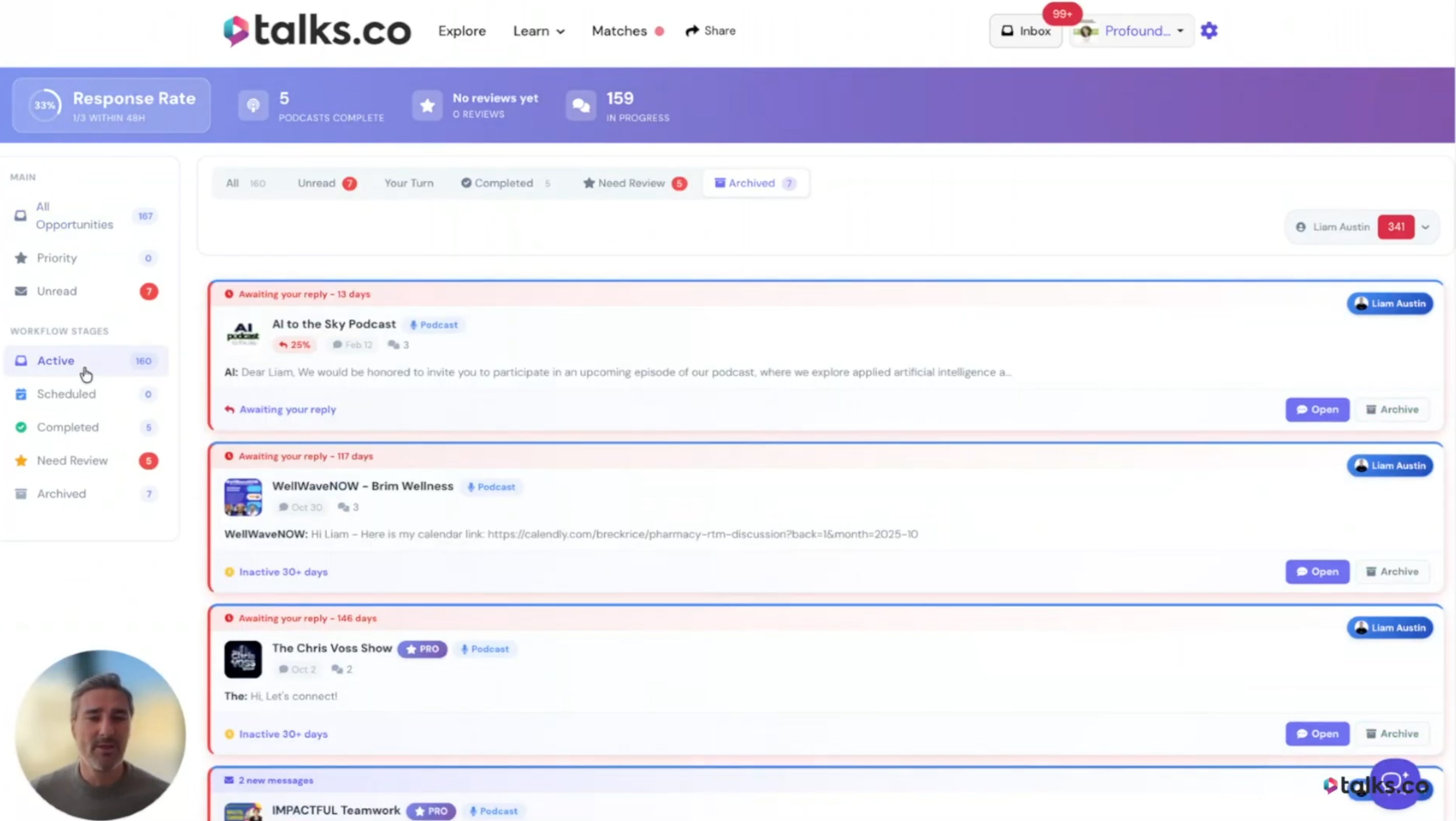
This is where every new conversation starts. A match has happened, messages have been exchanged, and the conversation is in progress.
What your job is here: Respond quickly and move toward scheduling; the longer a conversation stays inactive without progressing the more likely it is to go cold.
What the platform tracks: Your response rate is calculated from this stage and it’s visible to other users on your public profile; a high response rate is one of the clearest credibility signals on the platform.
The rule to follow: Reply to every message even if it’s to say you’re not a fit and move it to archived; a no is better than silence for your response rate and for the other person’s time.
2. 📅 Scheduled
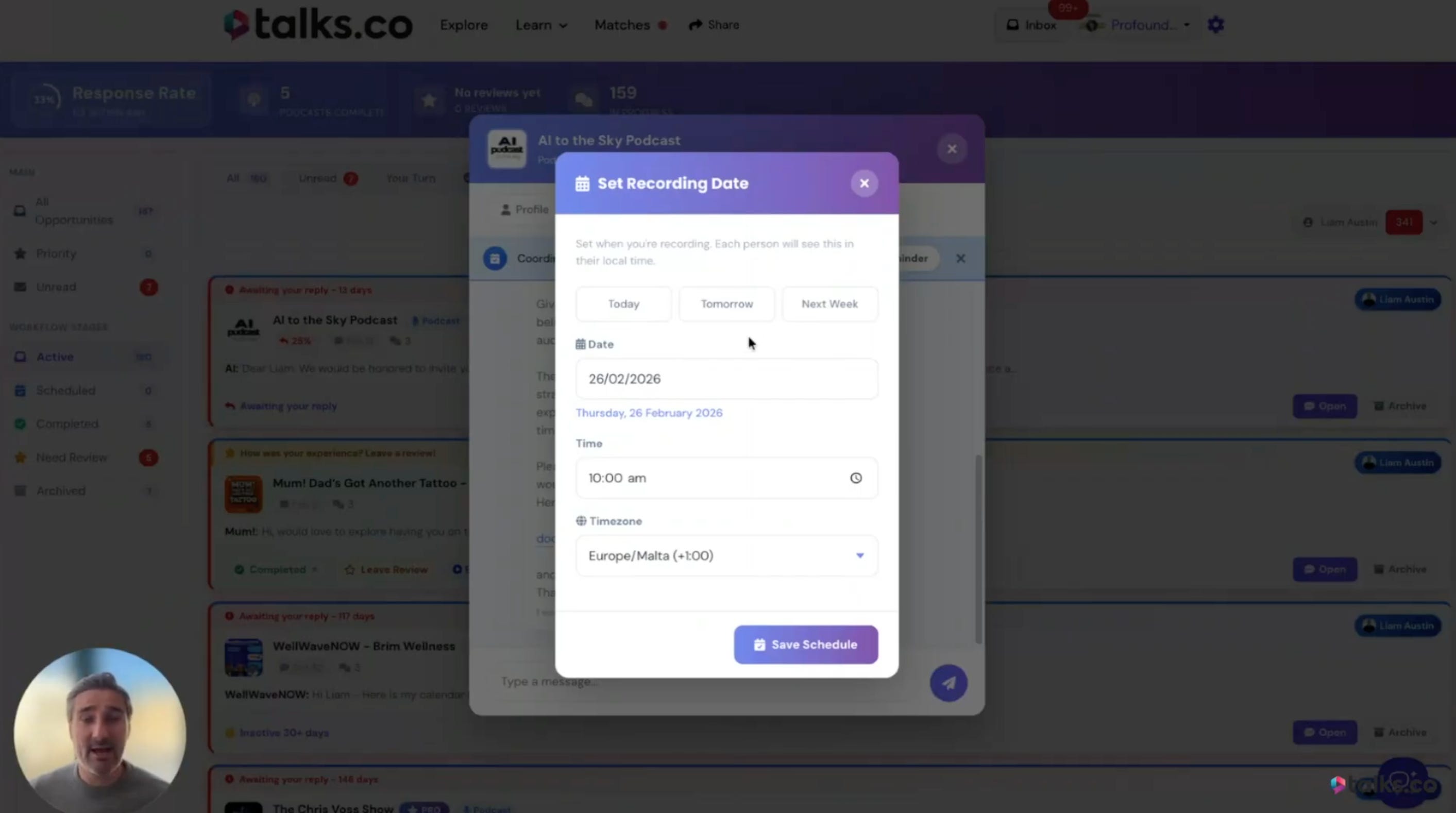
Once you’ve agreed on a time and the interview is on the calendar you move the conversation to scheduled.
What to do: Enter the date and time of the interview inside the Talks system, not just on your own calendar.
Why this matters: Talks can send you reminders as the interview approaches, track how many of your conversations are successfully reaching the scheduled stage, and show that stat to other users as a credibility signal.
What it tells other users: That you follow through on conversations and don’t just collect matches without converting them into actual recordings.
3. ✅ Completed
After the interview is recorded you move the conversation to completed.
What this stage represents: The interview has happened and the recording exists; the collaboration is done even if the episode hasn’t been published yet.
What the platform does here: Prompts you to leave a review for the host or guest you recorded with; this is the step most members skip and it’s one of the most valuable things you can do for your visibility on the platform.
What it shows on your profile: Your completed podcast count is public; it’s one of the authority signals other users look at when deciding whether to connect with you.
4. ⭐ Need Review
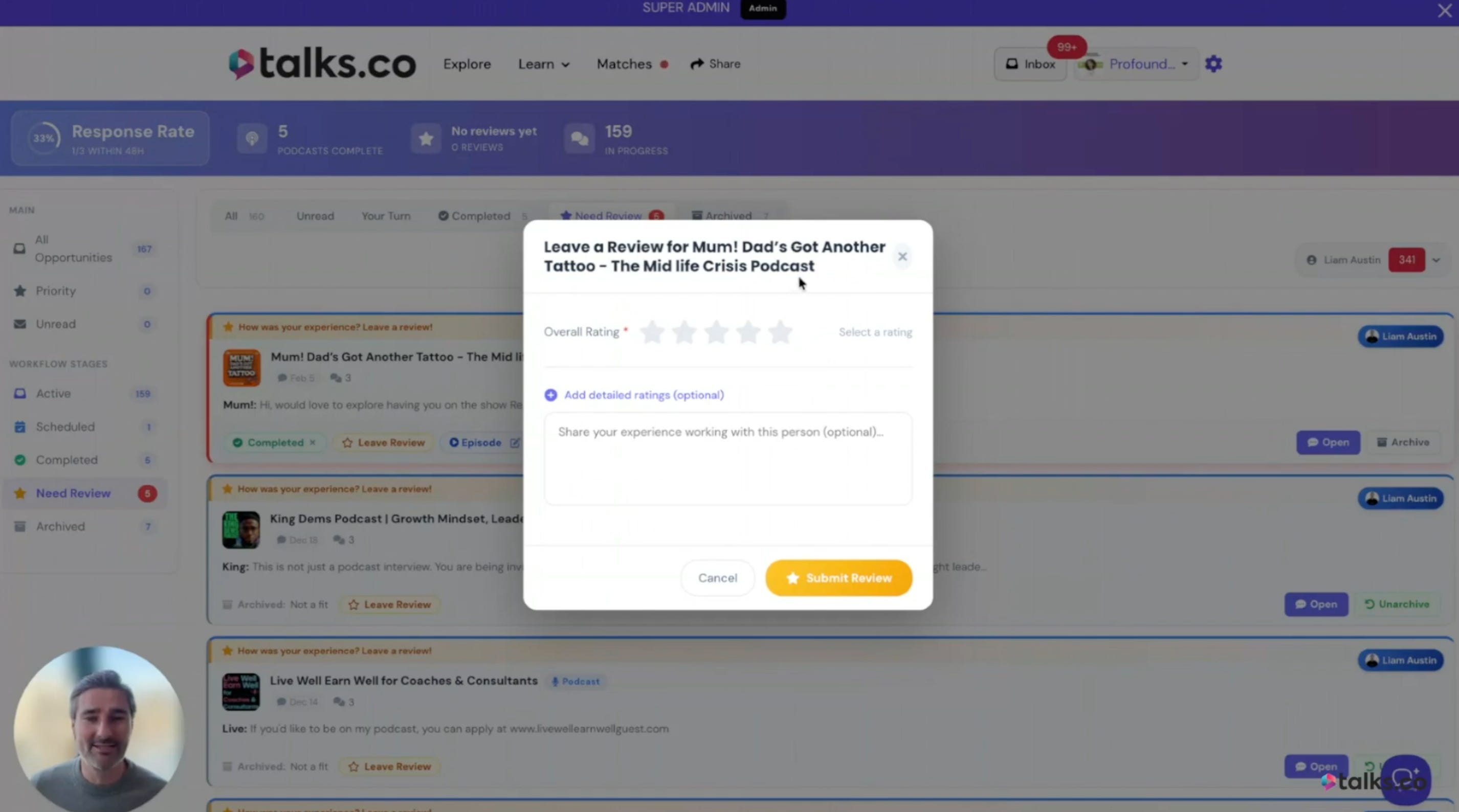
This stage appears after an interview is completed and prompts both parties to leave a public review.
What a review includes: A star rating and an optional written message that appears publicly on the other person’s profile.
Why leaving reviews matters: Reviews you give reflect on your reliability and engagement as a collaborator; members who consistently leave thoughtful reviews are seen as more professional and easier to work with.
What reviews you receive do for you: They build a visible track record of successful collaborations that hosts can see before they decide to connect; a profile with multiple strong reviews removes almost all hesitation from a host’s booking decision.
5. 📦 Archived
Once the review is done the conversation moves to archived and the workflow is complete.
What archived means: The collaboration is finished and the conversation doesn’t need to live in your active inbox anymore; it’s done, organized, and out of the way.
Why archiving matters: Keeping your active inbox clean means you can see clearly which conversations need your attention right now; a cluttered inbox leads to missed opportunities.
The goal of the whole workflow: Every single conversation should eventually reach archived through a completed recorded interview; that’s what the system is designed to produce.
3 Authority Signals That Affect Your Visibility
This is the piece most members don’t fully understand until they’ve been on the platform for a while.
Your Talks inbox isn’t just an organizational tool. It’s generating public data about how you show up as a collaborator and that data affects how other users perceive you and how the algorithm weights your profile.
Here are the three authority signals that matter most.
1. 🏃 Response rate
What it is: How quickly you reply to messages in your inbox, expressed as a percentage and visible on your public profile.
What a high response rate signals: That you’re active, engaged, and respectful of other people’s time; hosts who are choosing between two similar guests will almost always pick the one who replies faster.
How to maintain it: Reply to every message even if the answer is no; moving a conversation to archived after a polite decline counts as a response and keeps your rate healthy.
2. 🎙️ Podcasts completed
What it is: The number of interviews you’ve moved to the completed stage inside Talks, visible on your public profile.
What a high completed count signals: That you convert conversations into actual recordings consistently; this is the most concrete proof of reliability a host can see on your profile.
How it compounds: Every completed interview adds to this number permanently; after 10, 20, 30 completed interviews your profile is telling a story of consistent follow-through that no bio can replicate.
3. ⭐ Reviews received
What it is: The star ratings and written reviews left by hosts and guests you’ve collaborated with, visible on your public profile.
What strong reviews signal: That you showed up prepared, engaged well, and made the collaboration worthwhile for the other person; this is social proof that speaks directly to a host’s biggest booking concern.
How to earn them: Complete your interviews, do great work, and leave reviews for your collaborators promptly; the review system is reciprocal and members who give reviews tend to receive them.
💡 A profile with a high response rate, 15 completed interviews, and a handful of strong reviews will get more connection requests than a profile with a better bio and none of those signals.
Credibility on Talks is built through behavior, not description.
How to Use the Talks Inbox to Stay Organized
Once you start getting matches and conversations moving the inbox becomes a real tool for managing multiple opportunities at once without dropping anything.
Here’s the workflow that keeps things running smoothly.
Check your inbox daily and reply to anything in your turn to reply filter: The platform shows you exactly which conversations are waiting for your response so you never have to scroll through everything to figure out what needs attention.
Move conversations to scheduled the moment a time is confirmed: Don’t wait until closer to the date; logging the interview inside Talks immediately is what activates the reminder system and keeps your scheduled count accurate.
Set aside five minutes after every recorded interview to leave a review: Doing it immediately while the conversation is fresh produces the most genuine and detailed reviews; waiting means it often doesn’t happen
Archive completed conversations promptly: A clean inbox is a functional inbox; the faster you archive finished collaborations the clearer your view of active opportunities becomes.
What the inbox data tells the platform about you
The platform isn’t just tracking your inbox for your own organizational benefit. It’s using that data to help other users make decisions about you and to understand where you might be getting stuck in the workflow.
If you’re getting matches but not scheduling: The platform can see this pattern and it signals that something is breaking down between active and scheduled; this might mean your messages aren’t moving toward booking or your availability isn’t clear.
If you’re scheduling but not completing: This pattern signals follow-through issues and affects how the platform presents your profile to potential collaborators.
If you’re completing but not reviewing: You’re leaving one of the most valuable visibility tools on the platform unused and missing the reciprocal review that often follows.
The workflow isn’t just an organizational system. It’s a feedback loop between your behavior on the platform and the visibility the platform gives you in return.
This is Part 4 of a 5-part series on how to use Talks.co as a complete podcast guest masterclass.
Here’s where we’re going:
✅ Part 1: Profile setup and getting found on Google
✅ Part 2: The video pitch, lead magnet, and Pro badge
✅ Part 3: AI matching, double opt-in, and advanced search filters
✅ Part 4 (you’re here): The inbox workflow and authority signals
Part 5: Reviews, your referral link, and how it all compounds over time
🔖 Save this post before you open your Talks inbox. The five-stage workflow above is the framework that keeps every conversation moving toward a published episode instead of quietly going cold.
P.S. Your response rate on Talks is public. Other users can see it before they decide to connect with you. Replying quickly to every message, even just to say you’re not a fit and archiving the thread, is one of the simplest things you can do to make your profile more attractive to the hosts you actually want to work with. 👇
Keep Talking,
Liam
~
Visibility systems to grow your personal brand, audience + authority with guest appearances. First online sale in 2001. Built multiple 6–7 figure online businesses. 400+ interviews. Malta, Stockholm, Sydney. Love soccer, surf & burritos.