
3 Talks Pro Profile Features That Turn Browsers Into Bookings
How to use the video pitch, lead magnet, and Pro badge on Talks.co to make hosts say yes before they've even sent a message

When a host finds your Talks profile and spends 30 seconds looking at it, what decision are they making?
They’re not deciding whether you’re a good person. They’re not even deciding whether you’re knowledgeable. They’re deciding one thing:
Is this guest going to be worth the risk of giving them an hour of my audience’s attention?
Everything on your profile either answers that question with a yes or leaves it unanswered. And an unanswered question almost always becomes a no.
The difference between a profile that gets connection requests and one that gets ignored isn’t talent.
It’s the 3 features that signal credibility, capture leads, and put you at the top of every search result on the platform.
This post is about those 3 features, how they work, and exactly how to set them up so your profile starts doing the heavy lifting for you.
What Most Podcast Profiles Are Missing and Why It Costs Them Bookings
Before we get into the features themselves it helps to understand what a host is actually looking for when they land on your page.
Energy and presence: A podcast host needs to know you’ll be engaging on mic before they commit to an interview; a text bio alone can’t tell them that.
A reason to trust you quickly: Credibility signals that are visible at a glance matter more than credentials buried in a paragraph.
An easy next step: Hosts who have to work to figure out how to connect with you or what you offer their audience will move on to the next profile.
These 3 features exist specifically to answer each of those three needs.
Talks Creator Profile Feature 1: The video pitch 📹
The video pitch is the single highest-leverage feature on your entire Talks profile and it’s the one most members either skip or underestimate.
Here’s what it actually does for you.
It answers the host’s biggest unspoken question: “Will this person be good on mic?” is the question every host carries into every booking decision; a 60-second video answers it before they’ve spent any time on you.
It shows presence, energy, and communication style: Things a written bio can describe but never actually demonstrate; a host watching your video pitch knows within thirty seconds whether you’re the kind of guest their audience will respond to.
It’s exclusive to Talks Pro members: Which means if you have it and the profile next to yours doesn’t, you’re already standing out in every search result and every match the algorithm surfaces.
What makes a great video pitch:
Length: 30 to 60 seconds maximum. If you can’t make your case in 60 seconds that itself is information hosts will notice.
What to cover: Who you are, what you talk about, who your ideal audience is, and one specific reason you’d be a valuable guest on the right show.
Tone: Conversational and natural, not scripted and stiff; hosts want to hear how you actually talk, not how you perform when you know you’re being recorded.
Setup: You don’t need a studio. Decent lighting, a clean background, and clear audio are enough because the content matters more than the production.
Talks Creator Profile Feature 2: The lead magnet on your public profile
This is the Talks Pro feature most guests think is just for hosts to see. It isn’t.
Your public Talks Creator profile is a web page that anyone can find. When someone hears you on a podcast and goes looking for you, when a host researches you before connecting, when someone finds your profile through Google search, they all land on the same page.
The lead magnet feature turns that page into a list-building asset.
What it does: Adds a visible lead magnet section to your public profile with a title, description, image, and direct link to your opt-in page or freebie.
Who it’s actually for: Not the host; the listeners who find your profile after an episode goes live and want to take the next step with you.
Why most guests miss this: They think of their Talks profile as a tool for getting booked, not as a landing page that keeps working after every interview; the two functions aren’t separate, they run in parallel.
What works well here: A guide, a checklist, a free training, a template, anything specific and immediately useful to the audience your podcast appearances are reaching.
How to set it up:
Go to your Talks profile and make sure you’re logged in
Find the lead magnet section below your profile image
Enter your lead magnet title, description, image, and URL
Save changes and check that the link is working on your public profile before you start promoting it
Once it’s live every appearance you do feeds traffic to a page that has a direct capture mechanism on it. That’s the connection between podcast visibility and actual list growth that most guests never build.
💡 The lead magnet feature is available on Pro.
If you’re on the free plan you can still set up your profile and speaker page but the lead magnet and video pitch features unlock with the upgrade. Both of them together are what turn a profile visit into a lead rather than just a view.
Talks Creator Profile Feature 3: The Pro badge and top placement in search 🏅
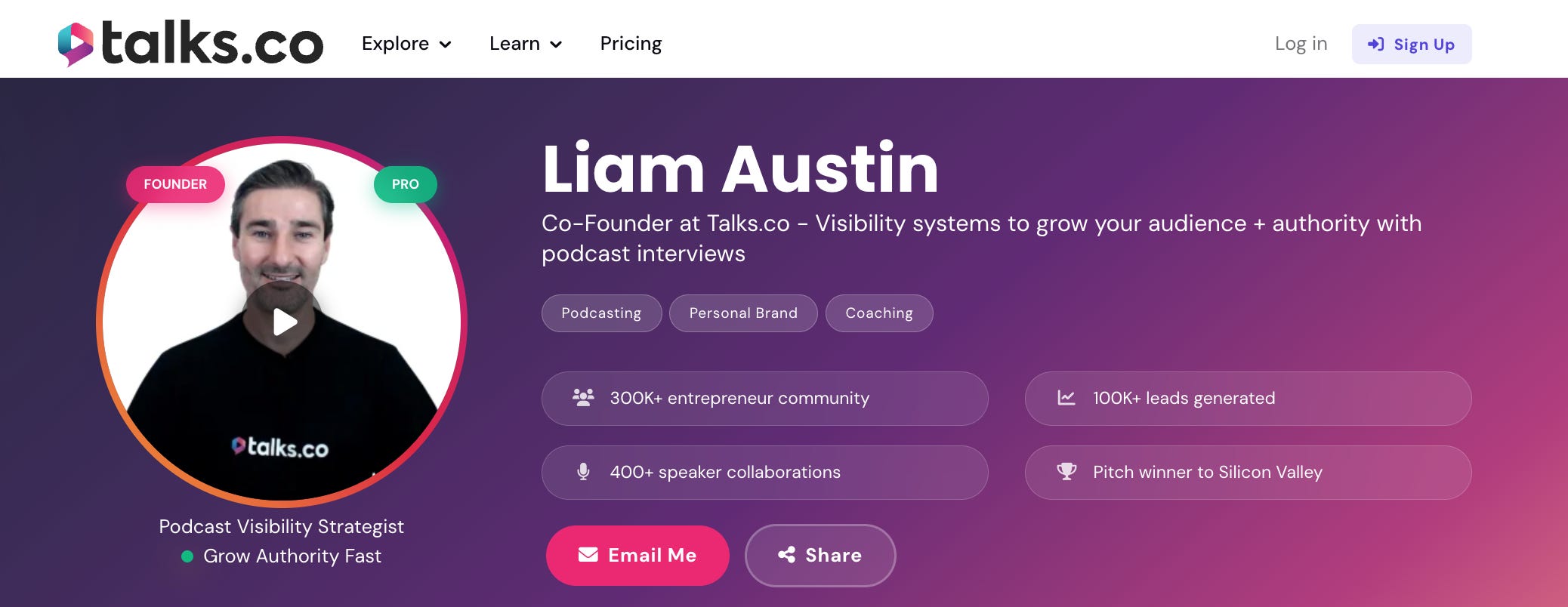
This one is less about a single feature and more about what your entire profile looks like in the context of everyone else on the platform.
Here’s the honest reality of how search works on Talks.
Pro profiles appear at the top of search results: The same way being on the first page of Google versus the third page changes everything, appearing above free profiles in Talks search means hosts find you before they find the alternatives.
The Pro badge is visible on your profile: It signals immediately that you’re a serious player who’s invested in the platform; hosts who are themselves Pro members often filter to connect only with other Pro members.
3.9x more visibility: Pro Talks Creator profiles receive significantly more profile views than free profiles because of placement, badge visibility, and the way the algorithm weights active invested members in its matching.

What this means in practice:
A complete free profile: Shows up in search results but below Pro profiles; gets matched by the AI but with less frequency and less priority.
A complete Pro profile: Appears at the top of search, gets the badge, gets the video pitch slot, gets the lead magnet section, and gets 30 connections per month instead of 1.
The gap between those two experiences isn’t subtle. It’s the difference between a profile that occasionally gets found and one that consistently gets found first.
How These 3 Talks Features Work Together
Here’s what the full picture looks like when all 3 are set up and working.
A podcast host finds your Talks Creator profile through a match, a search, or a Google result for your name.
They see the Pro badge and immediately know you’re an invested, serious guest.
They watch your video pitch and decide within 60 seconds that you have the presence and expertise their audience would respond to.
They click through to connect and notice your lead magnet, which tells them you have a real offer and a real audience of your own.
They send a connection request because every signal on your page said yes before they even had to think about it.
That’s not a hypothetical sequence. That’s what a fully built Pro Talks Creator profile is designed to do every single time someone lands on it.
This is Part 2 of a 5-part series on how to use Talks as a complete podcast guest masterclass.
Here’s where we’re going:
✅ Part 1: Profile setup and getting found on Google
✅ Part 2 (you’re here): The video pitch, lead magnet, and Pro badge
Part 3: AI matching, double opt-in, and advanced search filters
Part 4: The inbox workflow and the authority signals that get you more bookings
Part 5: Reviews, your referral link, and how it all compounds over time
🔖 Save this post before you open your Talks profile settings. The 3 features above are the ones that separate profiles that get bookings from profiles that get views. Set them up once and they work for you on every match from that point forward.
P.S. The video pitch is the feature most Pro members set up last because it feels like the most effort. It’s actually the fastest one to do and the one that makes the biggest immediate difference to your acceptance rate. 30 seconds on camera. That’s the whole ask. 👇
Keep Talking,
Liam
~
Visibility systems to grow your personal brand, audience + authority with guest appearances. First online sale in 2001. Built multiple 6–7 figure online businesses. 400+ interviews. Malta, Stockholm, Sydney. Love soccer, surf & burritos.