
Why Guest Conversations Go Cold Before They Become Bookings (And How to Stop It)
How to manage multiple guest conversations simultaneously on Talks.co without losing momentum, dropping threads, or watching good opportunities quietly disappear

A full recording calendar doesn’t fail at the outreach stage.
It fails in the gap between a promising conversation and a confirmed recording date.
The host sent the connection request. The guest accepted. The first message went well. And then somewhere in the back-and-forth of scheduling, the thread went… quiet.
Nobody made a decision or sent a polite no. The conversation kind of just stopped moving and eventually stopped altogether.
That gap is where more recording calendar opportunities disappear than at any other stage because managing multiple conversations simultaneously without a system turns the gap into a default outcome rather than an exception.
The Talks inbox was built to close that gap.
Using it deliberately is what separates hosts who consistently convert conversations into recordings from hosts who consistently have conversations that almost became recordings.
Why Multiple Conversations Are Harder to Manage Than They Look
A single guest conversation is straightforward. You know where it stands, whose turn it is to reply, and what the next step is.
Five simultaneous guest conversations in different stages introduce a complexity that grows faster than linearly.
“Which conversation is waiting for your reply?”
“Which one has a scheduling link that’s been sent but not used?”
“Which one agreed on a date that hasn’t been logged anywhere?”
“Which one went quiet three days ago and needs a follow-up?”
Without a system those questions get answered by scrolling through an inbox and reconstructing the state of each conversation from memory.
That reconstruction takes time, produces errors, and creates the delays that cause conversations to go cold.
With a system each conversation has a visible stage that tells you exactly what state it’s in and exactly what needs to happen next.
The inbox becomes a dashboard rather than a pile.
5-Stage Workflow That Keeps Every Conversation Flowing
Every podcast guest conversation in your Talks inbox can move through 5 clear stages. Moving conversations deliberately through each stage is the habit that prevents the gap from swallowing your calendar opportunities.
1. 🟢 Active: The conversation is open and in progress
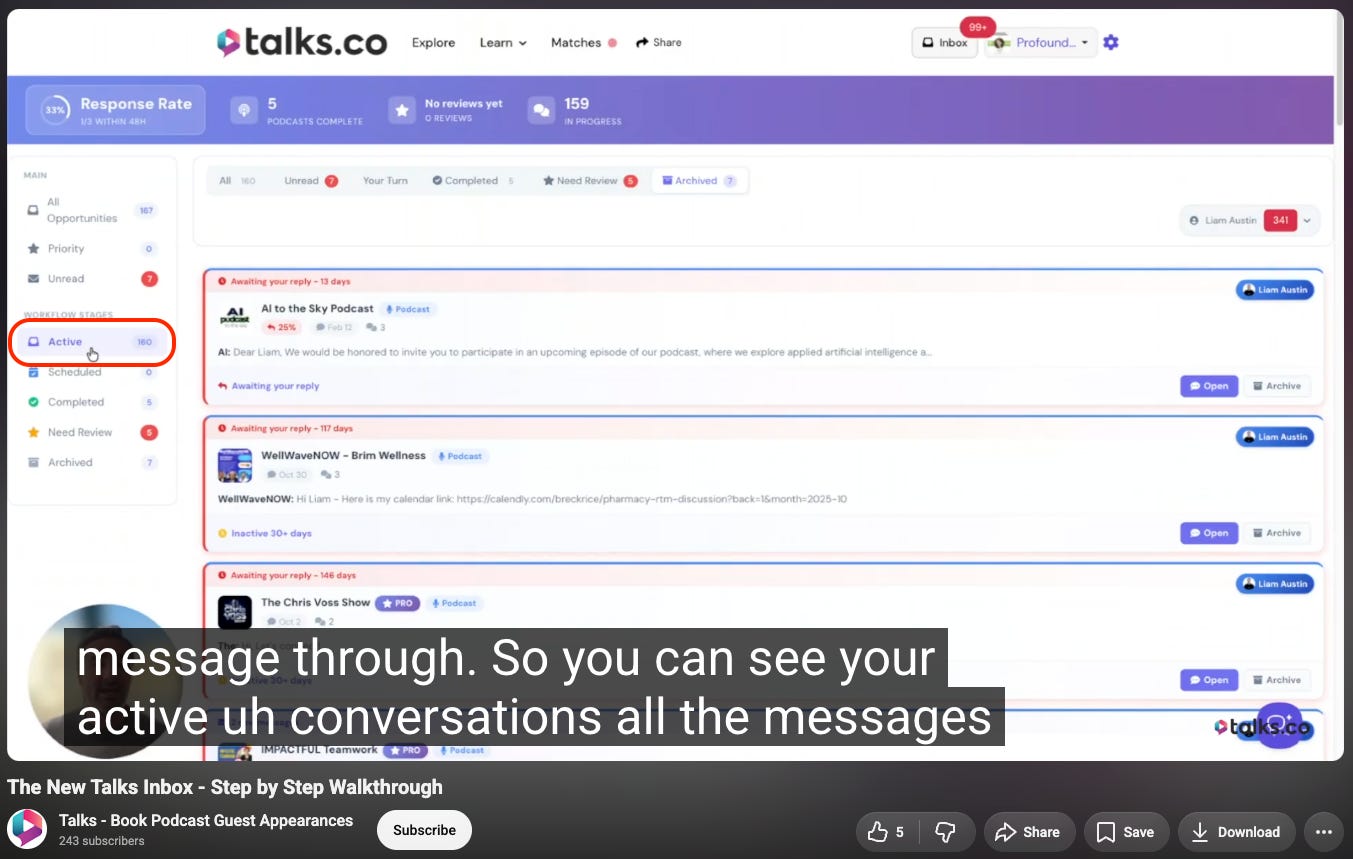
Every new conversation starts here. A match has happened, messages are being exchanged, and the conversation needs to progress toward a scheduled recording.
What your job is at this stage: Respond quickly and move the conversation toward scheduling before momentum fades. The longer a thread stays active without progressing toward a recording date the more likely it is to stall permanently.
What the platform tracks here: Your response rate, calculated from how quickly you reply to active conversations and displayed publicly on your show profile. A high response rate signals to potential guests that connecting with you produces a real conversation rather than a slow-moving thread.
The rule worth following: Reply to every message within 24 hours even if the reply is brief. A short reply that keeps the conversation moving is more valuable than a comprehensive reply that takes three days to compose.
2. 📅 Scheduled: A recording date is confirmed and logged
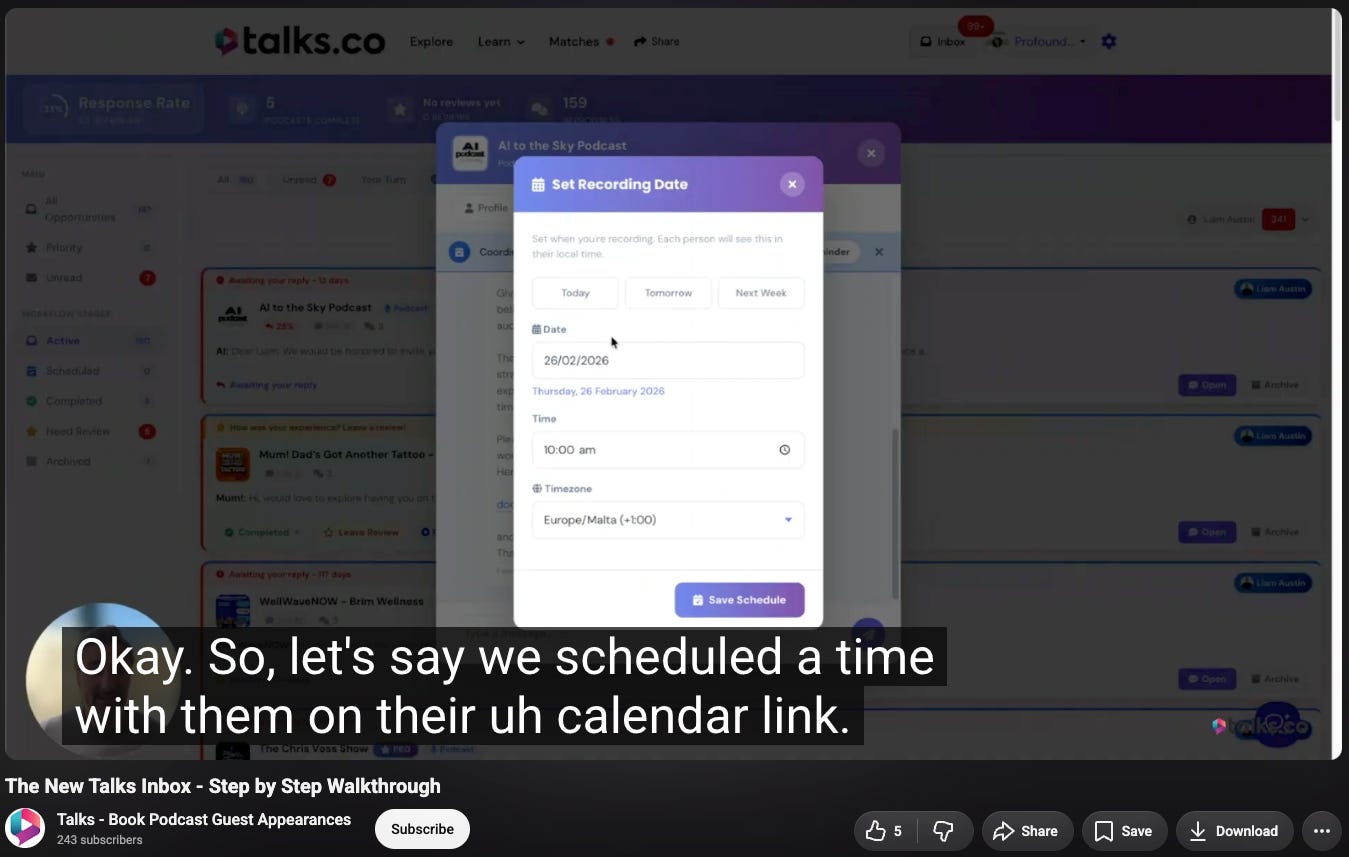
Once a podcast guest and a recording time have been agreed on the conversation moves to scheduled.
What to do immediately: Log the date and time inside the Talks system rather than only on your personal calendar. Logging it inside Talks activates the platform’s reminder system for both you and the guest, reducing no-shows and last-minute cancellations significantly.
What the scheduled count on your profile signals to potential guests: That you convert conversations into actual recordings consistently. A host with a high scheduled count is a host who follows through, which makes connecting with you a safer bet for a guest who is allocating their appearance time carefully.
What logging inside Talks produces that a personal calendar entry doesn’t: A visible signal of reliability that strengthens your show profile’s credibility with every future guest who evaluates it.
3. ✅ Completed: The recording has happened
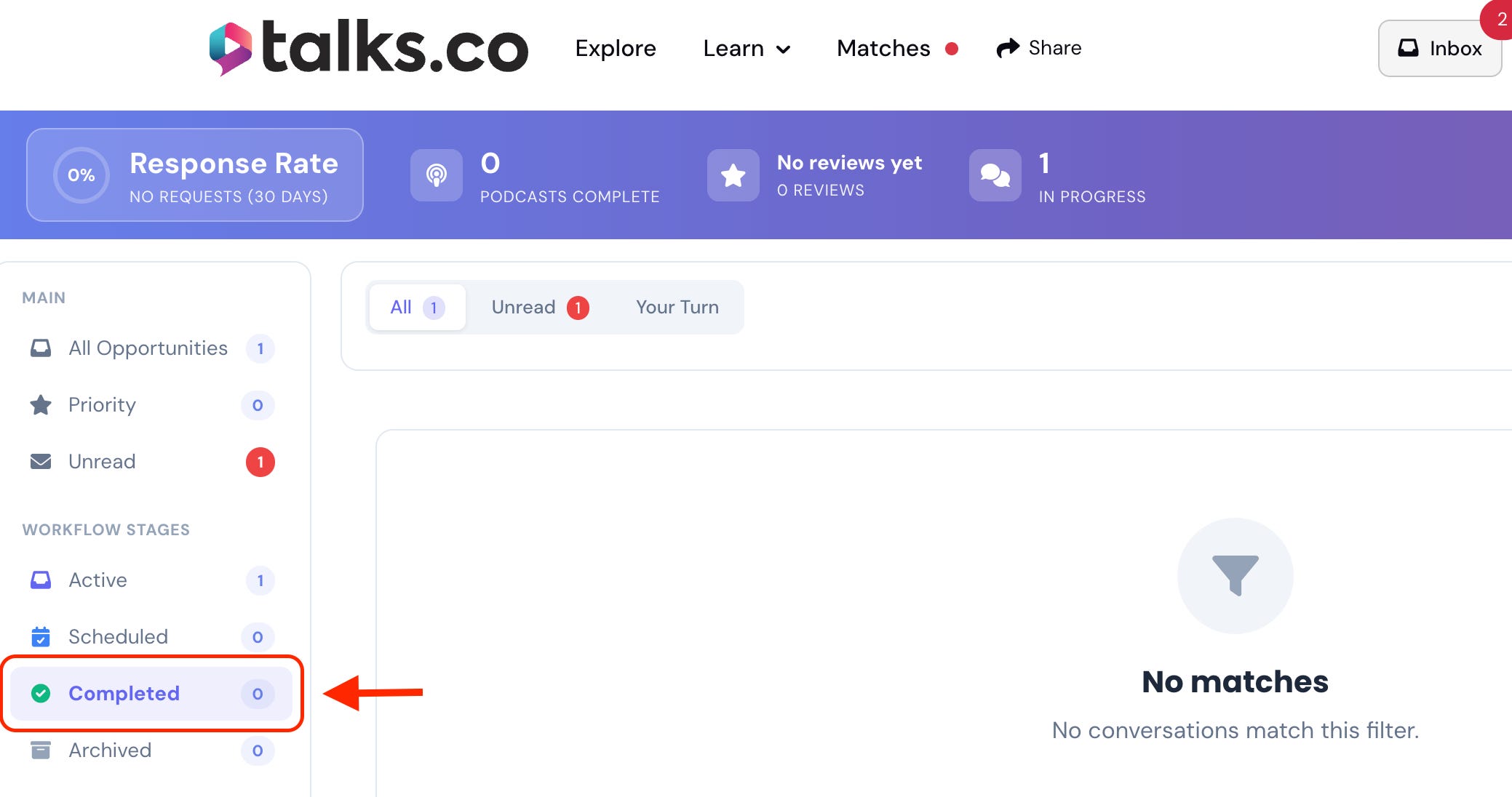
After the interview is recorded the conversation moves to completed even if the episode hasn’t been edited or published yet.
What the platform does here: Prompts both you and the guest to leave a review; the review step is the one most hosts skip and it’s the step that builds the visible reputation that makes every future guest acquisition easier.
What your completed count adds to your show profile: Evidence that your conversations produce actual episodes rather than just accepted connections. A host with 30 completed recordings is a fundamentally different proposition to a potential guest than a host with 3.
What to do immediately after completing a recording: move the conversation to completed in the Talks inbox before you move on to anything else. The 2-second action keeps your completed count accurate and triggers the review prompt while the recording is still fresh.
4. ⭐ Need review: Both parties are prompted to leave feedback
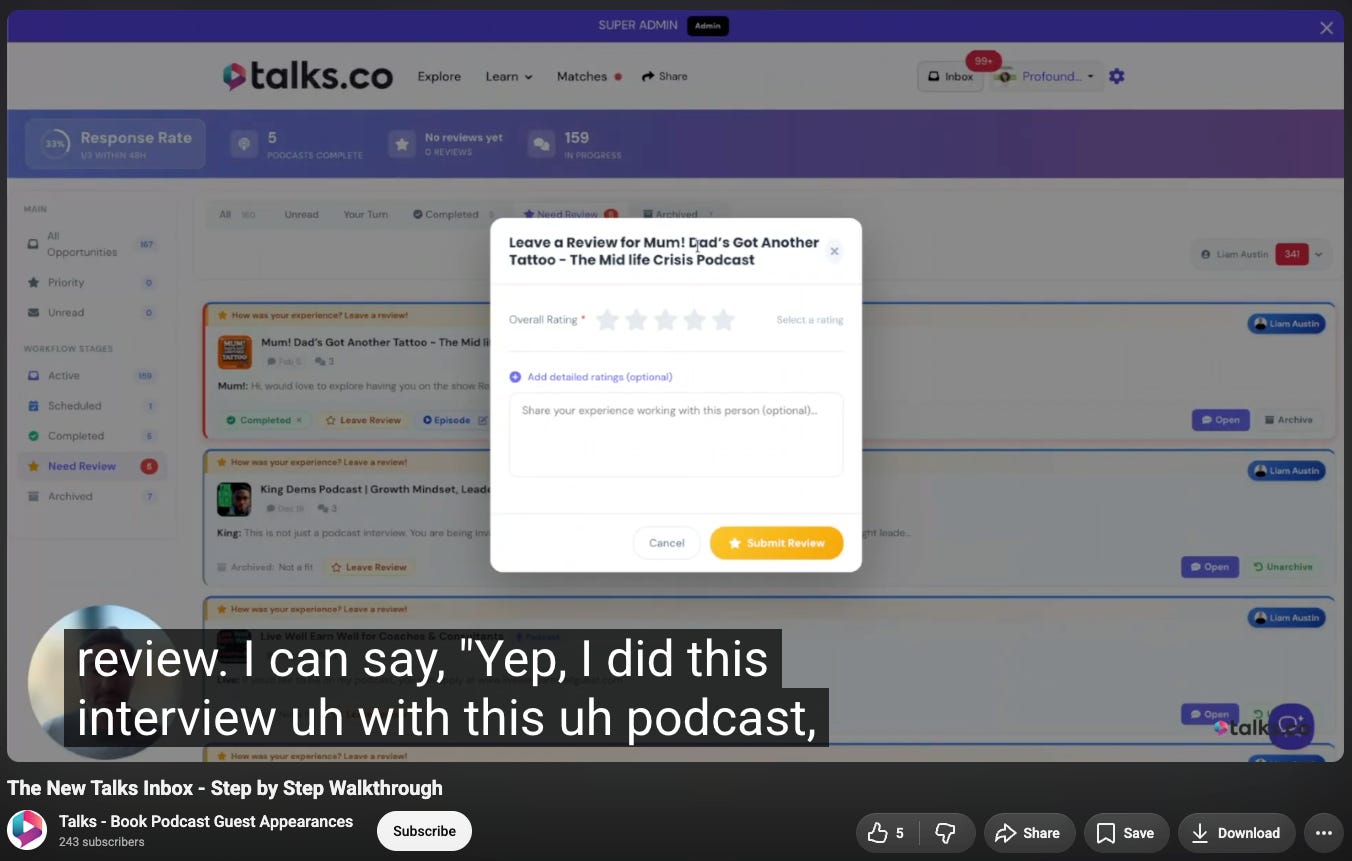
Reviews on Talks are public and visible to every potential guest who evaluates your show profile.
What a growing review profile produces for future guest acquisition: A visible track record that tells potential guests what it’s actually like to appear on your show. A host with 20 genuine written reviews from guests who recorded with them is a host whose show feels safer to appear on than a host with none.
Why leaving reviews for guests matters beyond reciprocity: A thoughtful written review from a host is a public endorsement that the guest can use as social proof. Podcast guests who receive reviews share them, reference them, and remember the host who wrote them when recommendations come up in their network.
The timing that produces the best reviews: Within 24 hours of the recording while the conversation is still fresh. Waiting until the episode publishes often means the review never gets written.
5. 📦 Archived: The collaboration is complete
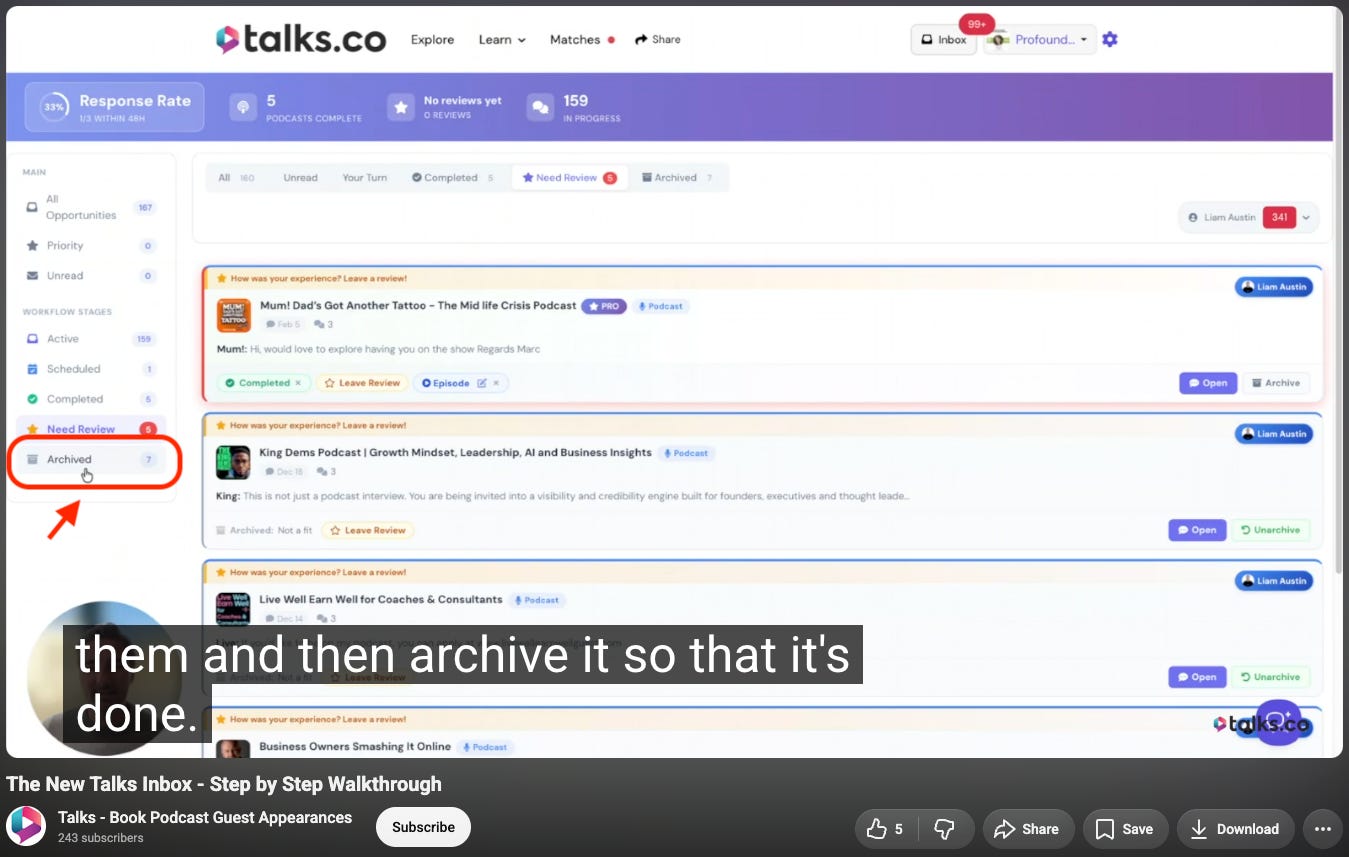
Once the review is done the conversation moves to archived and the workflow is complete.
What archiving produces for your active inbox: Clarity; a host who archives completed collaborations promptly can see at a glance which conversations need attention right now rather than scanning through a mix of active and completed threads.
What a clean inbox produces for calendar management: Accurate visibility into how many conversations are genuinely in progress versus how many are done and taking up space. That accuracy is what makes it possible to know whether the calendar is on track or whether more connections need to go out.
When to archive without a completed recording: When a conversation clearly isn’t going to produce a recording, move it to archived with a polite close rather than leaving it in active indefinitely. A closed conversation is information about what didn’t work, which is more useful than an open thread that isn’t going anywhere.
3 Habits that Prevent Conversations from Going Cold
The 5-stage workflow gives every conversation a clear path. 3 habits keep conversations moving along that path rather than stalling between stages.
1. ⚡ The 24-hour reply rule

Every message in your active conversations gets a reply within twenty-four hours.
What this produces for conversation momentum: A guest who receives a reply within twenty-four hours stays in the mental space of the conversation. A guest who waits 3 days for a reply has mentally moved on to other priorities and the re-engagement cost is higher than the original engagement cost.
What to do when you don’t have a full reply ready: Send a brief acknowledgment that tells the guest you’ve seen their message and will respond fully within a specific timeframe. “Got this, will send scheduling options tomorrow.” keeps the conversation alive without requiring the full reply immediately
What a consistently high response rate produces over time: A credibility signal on your show profile that works passively. Every potential guest who looks at your profile and sees a high response rate adds that to their assessment of whether connecting with you is worth their time.
2. 📋 The scheduling offer that removes friction
When a conversation reaches the point where a recording date needs to be agreed on, make the scheduling process as frictionless as possible for the guest.
What frictionless scheduling looks like: Offering 2 or 3 specific time windows with your timezone and letting the guest choose, or sending a direct booking link that shows available slots without requiring email back-and-forth.
What scheduling friction looks like: “What times work for you?” sent without any constraints, which puts the entire scheduling burden on the guest and introduces a round of back-and-forth that can take a week to resolve.
What happens to conversations where scheduling friction is high: They stall at the scheduling stage more often than at any other stage. A conversation that should take one message to schedule takes 5 and the momentum that was present in the earlier messages has dissipated by the time a date is finally confirmed.
3. 🔁 The 3-day follow-up for stalled conversations
When an active conversation goes quiet for 3 days without a reply, send a short follow-up that re-opens without pressure.
What a good follow-up looks like: 1 or 2 sentences that reference the previous message, restate your interest briefly, and make it easy for the guest to re-engage, e.g., “Just circling back in case this got buried, still happy to explore recording together if the timing works.”
What a bad follow-up looks like: A long message that restates everything from the beginning and implicitly communicates that you’ve been waiting and frustrated. That energy closes conversations rather than reopening them.
When to archive instead of following up: After 2 unanswered follow-ups the conversation isn’t going to produce a recording. Move it to archived, note what you learned about why it stalled, and redirect that connection opportunity to a guest who is actively moving forward.
💡 The inbox isn’t just an organizational tool. It’s a measurement system.
A host who looks at their inbox and sees 10 active conversations, 4 scheduled recordings, and 2 completed reviews has a clear picture of where their calendar stands and what needs attention.
A host who looks at their inbox and sees 40 conversations in varying states of dormancy has a pile, not a pipeline. The 5-stage workflow is what turns the pile into the pipeline.
The Inbox Audit Worth Doing Before Your Next Connection Goes Out
Open your Talks inbox right now and categorize every open conversation honestly.
How many are genuinely active and moving toward a scheduled recording?
How many stalled more than three days ago and need a follow-up or an archive?
How many are scheduled and logged with a date?
How many are completed and waiting for a review?
The answer to those questions is a more accurate picture of your recording calendar’s health than the number of connection requests you’ve sent this month.
Fix the stalled ones before you send new connections. A pipeline with 10 stalled conversations and 5 new connections is not a fuller pipeline. It’s a messier one.
Clear the stalled conversations. Move the active ones forward. Then add new connections at the rate the cleared pipeline can absorb.
This is Part 3 of a 5-part series on filling your recording calendar in 30 days using Talks.
The full series:
✅ Part 1: Creating a show profile that attracts more guest applications and matches
✅ Part 2: Using audience size and publishing frequency filters to find better-fit guests faster
✅ Part 3 (you’re here): Managing multiple guest conversations without losing momentum
Part 4: Building a guest pipeline that keeps your recording calendar consistently full
Part 5: Creating a long-term booking system that compounds month after month
🔖 Save this post before you open your Talks inbox. The five-stage workflow and the three habits above are worth applying to your current open conversations before you add new ones to the mix.
P.S. The inbox audit at the end of this post takes five minutes and produces more useful information about your recording calendar’s health than any metric other than the number of episodes currently scheduled. Do it now before you send your next connection request. A pipeline with 10 stalled conversations doesn’t need more connections. It needs the stalled ones resolved. 👇
Keep Talking,
Liam
~
Visibility systems to grow your personal brand, audience + authority with guest appearances. First online sale in 2001. Built multiple 6–7 figure online businesses. 400+ interviews. Malta, Stockholm, Sydney. Love soccer, surf & burritos.