
The Two Features That Keep Your Profile Working When You’re Not
How auto-accept matches and auto-responses on Talks Pro turn passive profile activity into active booking momentum without adding anything to your schedule

A profile that attracts opportunities is the foundation.
What happens to those opportunities when you’re not actively logged in determines whether the foundation produces results or just potential.
Most guests check their Talks inbox when they remember to which means connection requests sit unanswered for days, matched profiles go cold before a conversation starts., and opportunities that arrived warm leave without becoming anything because the response came too late or not at all.
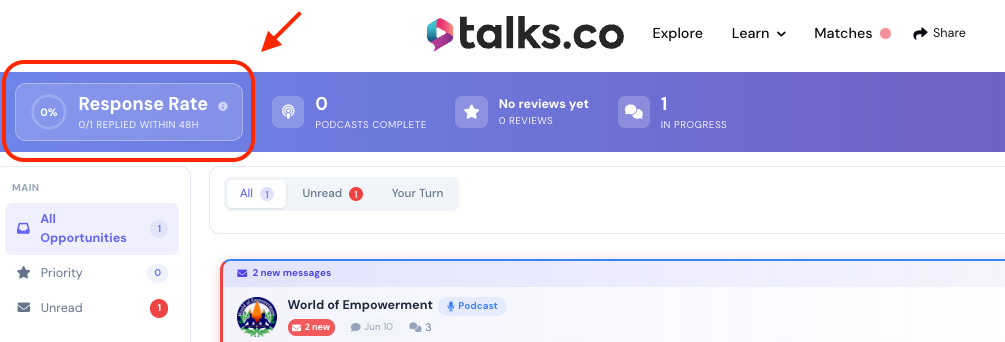
Response rate on Talks is public.
Every host who considers connecting with you can see how quickly you typically reply.
A low response rate on a strong profile is a credibility signal working against everything else the profile is working to build.
Auto-accept matches and auto-responses exist to close that gap.
Together they keep your profile active, your response rate healthy, and your inbox moving forward whether you’re logged in or not.
What Auto-Accept Matches Does For Creators Like You
Auto-accept is a Pro feature that automatically accepts connection requests from matches that meet criteria you set in advance.
Without it, every connection request requires a manual review and a deliberate accept before a conversation can open.
With it, the right connections open automatically based on the parameters you’ve established, and the conversations are waiting for you when you log in rather than waiting for you to log in before they can begin.
Three things auto-accept changes about how your profile operates.
1. ⚡ Speed of connection
The window between a host seeing your profile and deciding to connect is short. The window between a host sending a connection request and losing momentum if they don’t hear back is also short.
What manual review costs: Time between a host’s interest and an open conversation. A host who sent a connection request and waited 3 days for an accept is a colder conversation than a host who sent a connection request and found an open thread waiting the next morning.
What auto-accept produces: Conversations that open at the speed of the host’s interest rather than the speed of your inbox management schedule.
What faster conversations produce: More conversations that reach the scheduled stage before momentum fades. A significant portion of lost bookings on any platform are lost not because the host said no but because the thread went cold before it developed.
2. 📊 Consistent platform activity signals
The Talks algorithm weights active profiles more heavily than inactive ones in match suggestions and search placement.
What consistent activity signals to the algorithm: That your Talks Creator profile is worth surfacing to hosts because you’re reliably responsive and actively moving conversations forward.
What auto-accept contributes to activity signals: Connection requests being accepted promptly rather than sitting in a pending state for days. The platform reads prompt acceptance as engagement regardless of whether it was manual or automated.
What stronger activity signals produce: More prominent placement in the matches the algorithm suggests to hosts and more frequent appearance in search results for your topics.
3. 🗓️ More conversations in your inbox when you do log in

Auto-accept doesn’t remove your involvement from the process. It moves your involvement to a more valuable stage.
What your involvement looks like without auto-accept: Reviewing connection requests, deciding whether to accept, accepting manually, then starting a conversation.
What your involvement looks like with auto-accept: Logging in to find open conversations already waiting, skipping the review and accept stage, and going straight to building the relationship.
What this produces for your schedule: The same booking outcomes with less time spent on the administrative layer of the process and your attention goes to the conversations rather than the queue.
What the Talks Auto-Respond Feature Offers 💬
Auto-respond is a Pro feature that sends an initial message automatically when a connection opens, before you’ve logged in and seen the conversation.
The first message in any conversation sets the tone for everything that follows.
A host who opens a connection and receives an immediate, warm, specific response has a fundamentally different first impression of you than a host who opens a connection and sees an empty thread for two days.
Four things auto-respond changes about your first impression.
1. 🏃 Response rate health
Your response rate on Talks is calculated from how quickly you reply to messages. It’s visible on your public profile.
What a high response rate signals: That you’re organized, professional, and respectful of other people’s time. Hosts choosing between two equally qualified guests gravitate toward the one whose profile signals they’ll actually hear back.
What auto-respond contributes: An immediate first message that registers as a response before you’ve manually engaged. The response rate benefits from the automation even though the engagement that follows is still personal.
What a consistently high response rate produces over time: A credibility signal that strengthens every other element on your profile by framing the guest as someone who shows up reliably.
2. 🤝 A warm first impression before the manual conversation begins
A well-written auto-response does more than acknowledge the connection. It opens the conversation in a way that makes the host feel seen and makes the next step obvious.
What a warm auto-response looks like: a brief acknowledgment of the match, a one-line reference to what you cover and why it might be relevant to their show, and a clear invitation to continue the conversation
What it avoids: generic acknowledgment that could have been sent by anyone to anyone; the auto-response should feel like the beginning of a specific conversation rather than a confirmation email
What to include to make it specific without being manual: your headline and your most relevant topic angle pulled from your profile; a message that references what you do and who you help it for is specific enough to feel personal without requiring individual composition
3. ⏱️ Time recovered from first-message composition

Writing a first message to every new connection is a task that accumulates quickly when connections are arriving consistently.
What the time cost looks like at scale: thirty new connections per month at five minutes per first message is one hundred and fifty minutes per month spent on messages that all follow the same structure and serve the same function
What auto-respond recovers: that time, directed back toward the conversations that have progressed past the opening stage and require genuine personal engagement
What the recovered time produces: more attention on the conversations most likely to become bookings rather than equal attention distributed across every stage of every conversation
4. 🔄 More conversations progressing while you focus elsewhere
A host who receives an immediate auto-response is a host who is already in conversation with you before you’ve manually engaged.
What this means for conversion: conversations that start immediately convert to scheduled interviews at a higher rate than conversations that start after a delay; momentum in the early stage of a conversation is a predictor of whether that conversation reaches the scheduled stage
What this means for your inbox when you log in: conversations that are already in motion rather than conversations that are waiting to begin; your first interaction is a continuation rather than an initiation
What the combination of auto-accept and auto-respond produces: an inbox that is consistently active and moving forward regardless of how frequently you manually check it
💡 Auto-accept and auto-respond are not substitutes for genuine engagement. They’re the layer that keeps conversations moving between your active involvement sessions. The bookings still require real conversation, real scheduling, and real relationships.
What auto-accept and auto-respond remove is the delay and the administrative overhead that causes too many genuine opportunities to go cold before they ever become conversations worth having.
How to Set Up Both Features Effectively
Neither feature requires complex configuration. Both require a small amount of deliberate setup to work at their best.
Setting up auto-accept:
Define the criteria that qualify a match for automatic acceptance: Topic alignment, audience size, platform activity level, and Pro status are the most commonly useful filters. Connections that meet your criteria auto-accept, those that don’t arrive in your manual review queue.
Start with conservative criteria and expand: It’s easier to accept more connections over time as you develop confidence in the filter than to deal with a flood of low-quality auto-accepted connections from criteria set too broadly at the start.
Review your auto-accepted connections periodically: Even well-set criteria produce occasional mismatches. A brief weekly review keeps the quality of your auto-accepted conversations consistent.
Setting up auto-respond:
Write a first message that is warm, specific, and action-oriented: Reference what you cover, connect it briefly to the kind of show you’re a fit for, and make the next step obvious without being pushy.
Test it by reading it as if you were the host receiving it: Would you feel like this was the beginning of a real conversation or a form letter? The answer to that question is the answer to whether the auto-response is ready.
Update it when your positioning shifts: An auto-response written when your headline was vague should be rewritten when your headline becomes specific. The auto-response should reflect the current version of your profile, not the version that existed when you first set it up.
This is Part 2 of a 5-part series on building a Talks profile that works while you sleep.
The full series:
✅ Part 1: Building a Talks profile that attracts opportunities automatically
✅ Part 2 (you’re here): Using auto-accept matches and auto-responses to save time and increase activity
Part 3: Setting up lead magnets that capture subscribers from every appearance
Part 4: Optimizing your video pitch to build trust and improve conversion rates
Part 5: Using the Talks affiliate program to create an additional revenue stream while you grow
🔖 Save this post before you open your Talks Pro settings. The setup guidance for both features above is worth reading before you configure them so the criteria and the auto-response are deliberate rather than default.
P.S. Your response rate on Talks is public and every host who considers connecting with you sees it before they decide. A low response rate on a strong profile is a credibility signal working against everything else the profile is working to build. Auto-respond is the fastest way to keep that rate healthy without adding inbox management to your daily schedule. Set it up once. Let it run. 👇
Keep Talking,
Liam
~
Visibility systems to grow your personal brand, audience + authority with guest appearances. First online sale in 2001. Built multiple 6–7 figure online businesses. 400+ interviews. Malta, Stockholm, Sydney. Love soccer, surf & burritos.