
The Filter That Finds the Right Stage for Where You Are Right Now
How to use the audience size filter on Talks Pro to target podcast appearances that match your current track record, build credibility at the right pace, and create a progression that compounds

Bigger is not always better.
Most podcast guests default to targeting the largest audiences available whenever they have the chance.
The logic feels sound: more listeners means more exposure means more results.
Right?
But that logic breaks down in practice.
A podcast guest with three completed interviews pitching a podcast show with 100,000 listeners per episode is asking a host to take a risk that the host’s track record doesn’t support taking.
The audience size filter on Talks Pro exists to prevent that mismatch, not by limiting what you can reach, but by helping you build toward it in a sequence that actually works.
Why Audience Size Matching Matters More Than Audience Size Chasing
Every podcast host is making a bet when they book a guest.
The bet is that the podcast guest will be worth the audience’s attention.
A host with 100,000 listeners per episode has 100,000 reasons to be selective about that bet. A host with 2,000 listeners per episode? Has 2,000 reasons to be more flexible about it.
That’s not a judgment about which show is more valuable. It’s an observation about which bet is easier to win at which stage.
Early appearances on well-matched mid-tier shows: Build your completed interview count, generate your first reviews, and give you the track record that makes larger shows a realistic target rather than a long shot.
The track record that follows: Tells every host who evaluates you that someone else already took the risk and it went well. The more specific and credible that track record the more the risk of booking you diminishes in the host’s mind.
The progression that results: A guest who builds deliberately from well-matched shows to larger ones arrives at those larger shows with a profile that makes the booking decision easy rather than uncertain.
Audience size chasing skips the middle of that sequence. The results it produces reflect the skip.
What the audience size filter does on Talks Pro 🔍
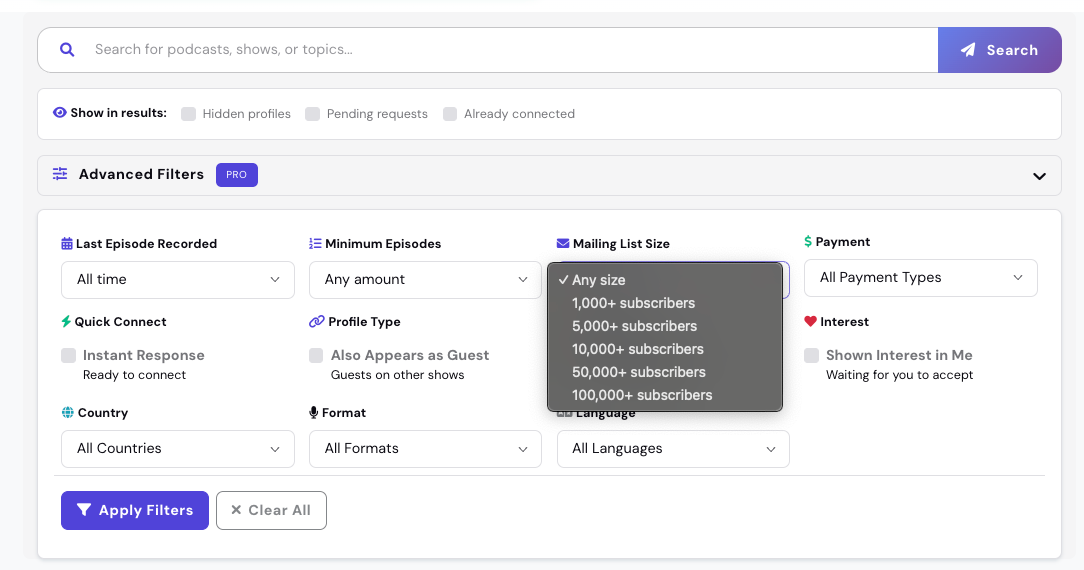
The audience size filter on Talks Pro lets you filter potential matches and search results by the host’s mailing list size or social following.
Two directions. Both useful at different stages.
Setting a minimum audience size:
What it does: Removes shows below a certain reach threshold from your results so you’re not spending connection requests on shows whose audience size doesn’t meet your current targeting criteria.
When to use it: When your track record is strong enough that you’re ready to target shows with meaningfully larger audiences and you want to focus your thirty monthly connections on that tier specifically.
What to set it at: A number that represents a genuine step up from the shows you’ve already appeared on rather than an aspirational ceiling; the filter works best as a progression tool rather than a fixed standard.
Setting a maximum audience size:
What it does: Removes shows above a certain reach threshold so you’re focusing on the shows most likely to say yes given where your track record currently stands.
When to use it: In the early stages of building your booking history when matching your stage matters more than reaching for the largest possible audience.
What to set it at: A number that reflects shows where your current profile is genuinely competitive. A completed interview count of 5 to 10 makes you competitive for a different audience size tier than a completed count of zero.
The 3 Stages of Audience Size Targeting 📈
Audience size targeting isn’t a one-time decision. It’s a progression that should evolve as your track record builds.
Stage 1: Building your foundation (0 to 10 completed interviews)
The priority at this stage is building a track record, not maximizing reach.
What to target: Shows with engaged niche audiences rather than large general ones; a highly engaged audience of 2,000 listeners in your exact niche often produces better results than a loosely aligned audience of 20,000.
What the audience size filter does here: Helps you find shows where your current profile is genuinely competitive and where the host is likely to say yes based on your existing track record.
What this stage produces: Completed interviews, first reviews, and the beginning of a visible track record that makes Stage 2 realistic.
Stage 2: Building momentum (10 to 30 completed interviews)

The priority at this stage is expanding reach while maintaining alignment.
What to target: Shows with larger audiences that still serve your specific niche; a track record of 10 to 30 completed interviews with strong reviews makes you a credible candidate for shows that would have been unlikely earlier.
What the audience size filter does here: Lets you set a minimum that reflects the reach you’re now genuinely competitive for while still filtering for shows where the niche alignment is strong.
What this stage produces: Larger audience exposure, stronger reviews from more prominent hosts, and a profile that starts attracting inbound connection requests from hosts who find it through search.
Stage 3: Compounding authority (30 or more completed interviews)

The priority at this stage is strategic placement rather than volume.
What to target: Flagship shows in your niche whose audiences represent the highest concentration of your ideal listener, client, or collaborator.
What the audience size filter does here: Lets you set a meaningful minimum that focuses your thirty monthly connections on the tier of shows that produce the most significant downstream outcomes for your business and reputation.
What this stage produces: The kind of media presence that generates inbound booking requests without active outreach, because your track record speaks clearly enough that hosts come looking.
💡 The audience size filter is most powerful when it’s used as a progression tool rather than a fixed setting. Revisit it every thirty days and ask whether your current filter settings still reflect your track record or whether your completed interview count and review profile have earned you access to a higher tier. The filter should grow with you.
What Audience Size Data Tells You Beyond the Number 📊
The audience size filter on Talks Pro gives you access to actual mailing list size and social follower counts for hosts on the platform. That data does more than help you filter. It helps you understand what you’re pitching before you pitch it.
Four things audience size data tells you that you can’t infer from a show name or description alone.
How selective the host is likely to be: A host with a 50,000 person email list has more to protect in a booking decision than a host with 500; knowing the size before you connect helps you calibrate how strong your profile needs to be to convert the connection into a booking.
What the downstream value of the appearance is likely to be: A larger, more engaged audience produces more lead magnet downloads, more profile visits, and more referral potential per episode than a smaller one. Knowing the size helps you prioritize your thirty monthly connections toward the appearances with the highest downstream value.
How much social proof the host already carries: A host with a large following has already built the trust with their audience that makes a guest appearance on their show a meaningful credibility signal. Appearing on a show whose host is themselves an authority compounds the credibility transfer from the appearance.
Whether the show is growing or established: Follower counts and list sizes in combination with publishing frequency and recent episode activity tell you whether a show is building momentum or maintaining an existing audience. Both can be valuable at different stages for different reasons.
The Targeting Decision Worth Making Before Your Next Connection 🔑
Before you send your next connection request on Talks, answer one question honestly.
Is this show the right size for where my profile currently stands?
Not where you want it to stand or where you’ll be in 6 months if everything goes well. Where it stands right now based on your completed interview count, your review profile, and the quality of your past appearances.
A yes means send the connection. A no means use the audience size filter to find a show that matches your current stage, build the track record that earns you access to the larger show, and arrive at it as the guest they’re looking for rather than the guest they’re uncertain about.
The filter doesn’t limit what you can reach. It sequences how you get there.
This is Part 4 of a 5-part series on building more visibility, more bookings, and more podcast opportunities with Talks Pro.
The full series:
✅ Part 1: What 3.9x more visibility actually means for podcast guests
✅ Part 2: How Pro placement increases profile discovery in search results
✅ Part 3: How the Pro badge helps build trust and improve booking rates
✅ Part 4 (you’re here): Using audience size filters to find better-fit podcast opportunities faster
Part 5: How 30 connections per month compound into a real media presence over time
🔖 Save this post before you open your search filters on Talks. The three-stage progression above is worth mapping against where your profile currently stands before you set your audience size filter for the next thirty days.
P.S. The audience size filter gives you access to actual mailing list and social following data for hosts on the platform. Most guests set a minimum and stop there. The guests who get the most out of the filter use the data to understand what they’re pitching before they pitch it: how selective the host is likely to be, what the downstream value of the appearance is, and whether the show’s audience aligns with the specific outcome they’re trying to produce from that appearance. The number is a starting point, not the whole picture. 👇
Keep Talking,
Liam
~
Visibility systems to grow your personal brand, audience + authority with guest appearances. First online sale in 2001. Built multiple 6–7 figure online businesses. 400+ interviews. Malta, Stockholm, Sydney. Love soccer, surf & burritos.